Most small businesses in 2026 are using some form of AI. But there is a significant gap between using a tool and having a system that actually works for your business. According to Goldman Sachs, only 14% of small businesses are fully integrating AI into core operations. The most common barriers are lack of technical expertise, data privacy concerns, and not knowing which tools to choose.
That gap exists because most businesses try to implement AI on their own, picking tools before understanding the problem. This article walks through what a structured AI implementation actually looks like when done correctly, step by step, from the first conversation to a live system.
Step 1. The Diagnostic Comes First
Before recommending any tool, a qualified implementation partner maps your current workflows. That means understanding how work actually moves through your business today, not how you think it moves or how it is supposed to move.
The diagnostic identifies where time is being lost, where errors are introduced, where handoffs break down, and which processes are repeatable enough to automate. It also surfaces compliance considerations specific to your industry before any technology decisions are made.
This step is non-negotiable. Skipping it and going straight to tool selection is the single most common reason AI implementations fail in small businesses. A tool without a mapped workflow is just another subscription you are not using.
At Execution Point Consulting, every engagement starts with a free AI Audit, a 60-minute working session that produces a written diagnostic report within 48 hours. No cost, no obligation.
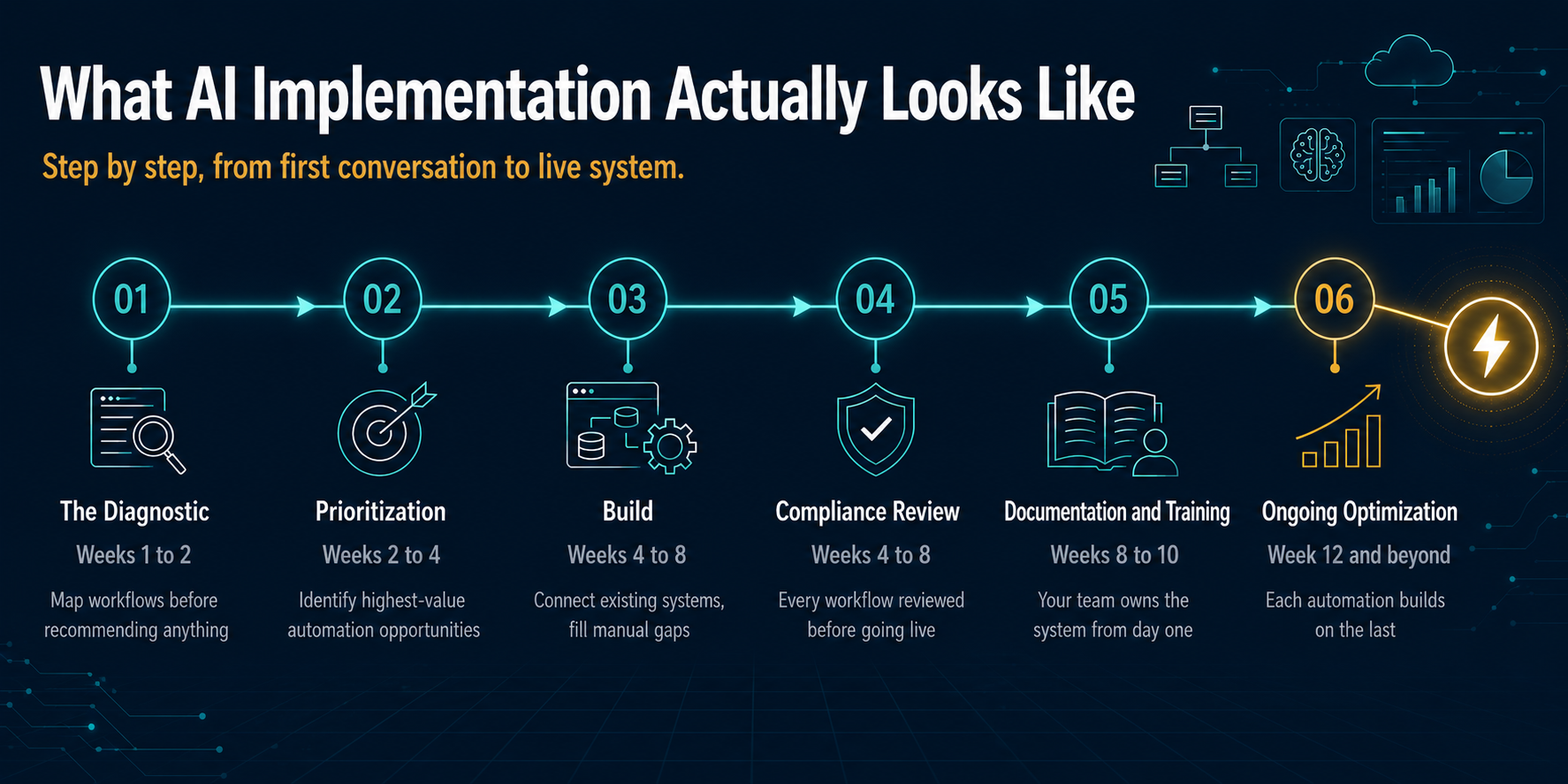
Step 2. Prioritizing What to Automate
Not everything gets automated at once. After the diagnostic, the next step is identifying which workflows deliver the most value when automated and which ones can wait.
The prioritization framework is simple. High-value automation candidates are workflows that are high volume, highly repetitive, rule-based, and currently creating bottlenecks or errors. Low-priority candidates are workflows that require significant human judgment, happen infrequently, or involve too many variables to systematize.
For most small businesses the first automation is something immediately visible and measurable. A client intake process, a follow-up sequence, a reporting dashboard. Starting with a visible win builds confidence across the team and proves the model before expanding.
Step 3. Building Against Your Actual Systems
AI implementation for small businesses is not about replacing your existing software. It is about connecting what you already have and filling the gaps where manual work is happening.
Most small businesses already use a CRM, an email platform, a calendar tool, and some form of document management. A platform-agnostic implementation partner builds automations that work across those existing systems rather than asking you to replace everything with a new platform.
This matters because vendor lock-in is a real risk. An implementation partner who is tied to a specific software vendor has an incentive to recommend that vendor regardless of whether it is the right fit for your business. A platform-agnostic partner recommends what is right for your operation, not what pays a referral fee.
Step 4. Compliance Review Before Anything Goes Live
For businesses operating in industries with data privacy, licensing, or documentation requirements, compliance review is built into the implementation process rather than added at the end.
This means every automated workflow is reviewed for potential compliance exposure before it touches a client, a document, or a sensitive process. It means data handling is documented and explainable. It means the humans who need to stay in the loop stay in the loop.
This is not just risk management. It is also a business continuity requirement. An automated workflow that creates a compliance gap is worse than no automation at all.
Step 5. Documentation and Training
When implementation is complete, your team receives full documentation of every system built. This includes how each automation works, what triggers it, what it does, and how to modify or disable it if needed.
Training is role-specific. The person who manages the CRM gets different training than the person who handles client intake. Nobody is handed a manual and expected to figure it out.
Documentation also protects your business if the implementation partner relationship ends. You own the systems. You understand how they work. You are not dependent on a vendor to keep them running.
Step 6. Ongoing Optimization
A live automation is the beginning of the process, not the end. As your business changes, as volumes increase, as new tools become available, your automations need to evolve.
Ongoing optimization means reviewing what is working, identifying new automation opportunities as they emerge, and making adjustments before problems develop rather than after. For most small businesses this looks like a monthly or quarterly check-in with a structured review of system performance and a prioritized list of next improvements.
The compounding effect is real. Each additional automation builds on the infrastructure already in place, which means each subsequent implementation moves faster and costs less than the one before it.
What This Looks Like in Practice
The typical timeline for a small business AI implementation looks like this:
Weeks 1 to 2: Diagnostic and prioritization
Weeks 2 to 4: Process documentation and workflow mapping
Weeks 4 to 8: Build and compliance review
Weeks 8 to 10: Testing and team training
Weeks 10 to 12: Go live and first optimization review
Most businesses see their first automation live within 4 to 6 weeks of kickoff. Full implementation across multiple workflows typically runs 8 to 12 weeks depending on the number of systems being integrated.
Where to Start
The diagnostic is always the starting point. Not a software demo. Not a proposal. A structured review of your actual workflows that tells you exactly where automation delivers value and what it would cost to get there.
The free AI Audit at Execution Point Consulting covers this in 60 minutes. You receive a written report within 48 hours. No cost, no obligation, no generic advice. You keep the report regardless of whether you move forward.